
Export
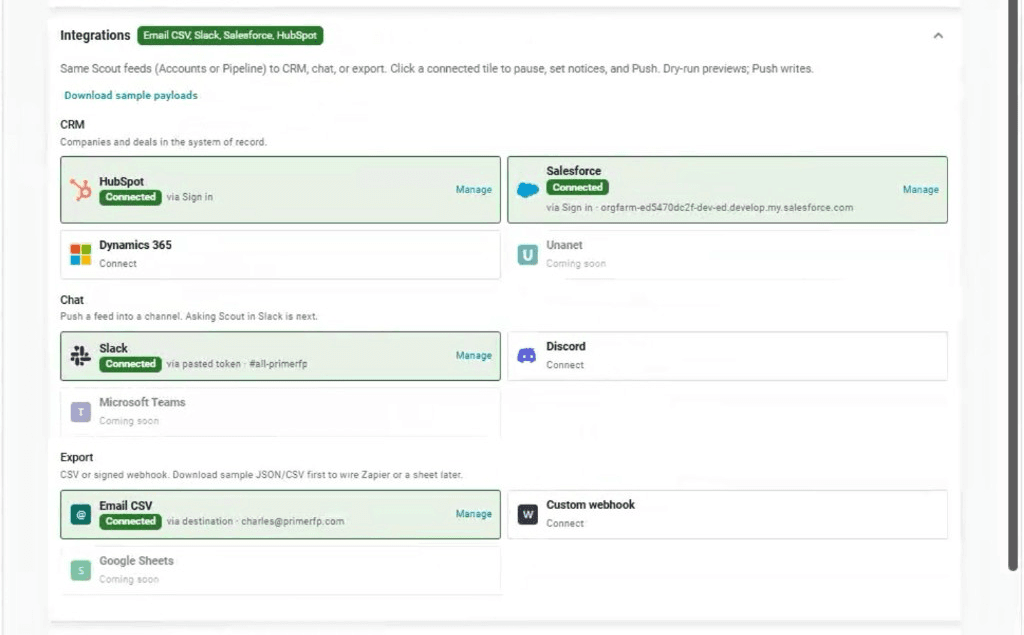
Email CSV or a signed webhook — when you still need the file
For Zapier, Make, n8n, or a Monday inbox. Download samples before you save a live URL.
CRM and Chat start at Tactics (Pilot included). Export is on any account. Not Free, MCP Trial, or Explorer.
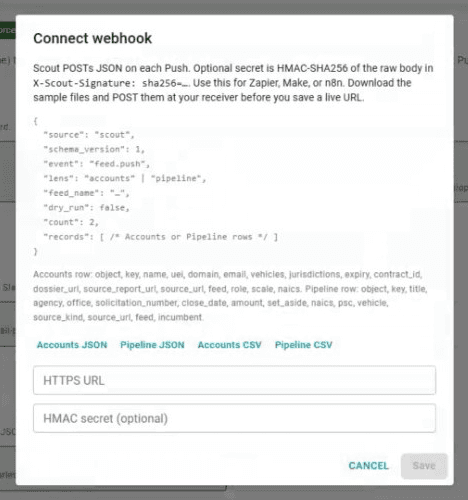
What the webhook sends
SCOUT POSTs JSON on each push. Accounts or pipeline rows — same facts you would see in the CRM land, in a payload you can wire.
- Accounts: name, UEI, domain, email, vehicles, expiry, dossier URL, report URL
- Pipeline: title, agency, solicitation, close date, amount, set-aside, NAICS, PSC, incumbent
- Sample tabs: Accounts JSON, Pipeline JSON, Accounts CSV, Pipeline CSV
FAQ
Questions
- Which plan includes Export?
- Any SCOUT account. That is not Strategic pipeline Export (CSV/PDF from the intel UI). CRM and Chat start at Tactics.
- What does the signed webhook send?
- JSON on each push. Accounts: name, UEI, domain, email, vehicles, expiry, dossier URL, report URL. Pipeline: title, agency, solicitation, close date, amount, set-aside, NAICS, PSC, incumbent. Optional HMAC-SHA256 in X-Scout-Signature. Download samples before you save a live URL.
- When do I use Export instead of CRM?
- Use CRM + Chat when this conversation found the recompete and you want that record in HubSpot, Salesforce, or Dynamics. Use Export for Zapier, Make, n8n, or a Monday inbox.
- Is Google Sheets live?
- No. Email CSV and the signed webhook are live.
Wire the webhook, or skip the file
Tell us the receiver if you need a signed POST.
SCOUT pushes one way. CRM edits do not flow back. Report URLs on the record are the intel. Empty Slack means Chat is not connected. Slack is a pasted bot token — no Sign in, no DMs, no Ask SCOUT in Slack. SCOUT does not write Fit Score, PWin, or GO/NO-GO, and does not change stage or owner after create.